
AF Points
The AF modes described above determine when AF starts, when it stops or whether it stays active. What they do not do is determine is where the camera focuses. You do this be selecting an appropriate AF point selection mode.
A quick digression first though. Where the camera focus is known as the plane of focus. This is a two-dimensional plane parallel to the camera, and is where the image is at its sharpest. When you or your camera adjust focus the plane moves. As you focus closer, the plane moves towards the camera. Focus further away and the plane moves further from the camera. Depth of field extends out from the plane of focus, and it is depth of field that makes sharpness three-dimensional. (If it did not, then sharp focus would only be seen in a thin sliver across the image space, everything in front or behind that sliver would be out of focus.
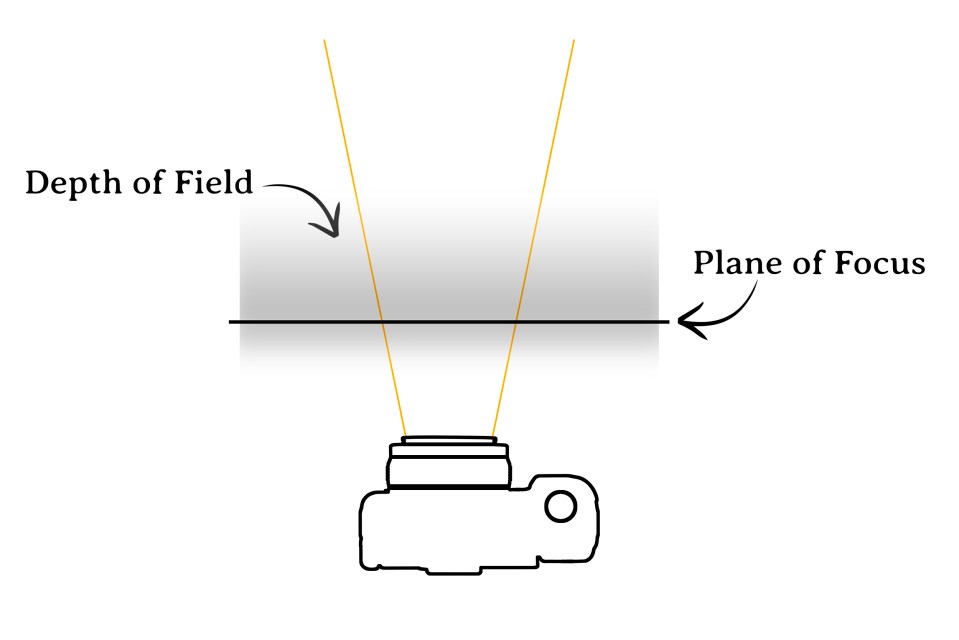
AF points determine where the plane of focus is. When a single AF point finds focus it is the only one that has ‘found’ an object at the plane of focus. When two or more focus points lock focus then two or more objects (or different areas of the same object) are intersected by the plane of focus.
Now, back to AF points. There are essentially two options when it comes to choosing AF points: either you select which AF point(s) the camera should use to determine focus, or you let the camera decide automatically.

Auto selection
Choose Auto selection and you abdicate responsibility of AF point selection to your camera. This is not ideal when precise focusing is required as you have no control of what the camera is likely to select. That said, Auto selection typically locks onto whatever is closest to the camera (and is within the focusing range of the lens). If you know for certain that there is nothing between the camera and your subject then Auto selection will work well and takes the stress out of AF point selection.
Single point selection
Select this mode and you can choose to focus with a particular AF point, using a control dial, pad or joystick to jump between the available AF points. The number of available AF points and their closeness together varies between camera models. DSLRs typically have a limited number of AF points shown in the viewfinder, clustered in a well-defined and fixed area at the centre of the viewfinder. Mirrorless cameras (or DLSRs in Live View) do not have this restriction, and, in Single point selection, the AF point can be freely moved around virtually the entire image frame.
The main advantage of Single point selection is the very precise way you control where the camera focuses. It is ideal for portraiture (when you could move the AF point to the subject’s eye, for example), or macro photography. It is also useful for off-centre subjects and avoids the need to use the focus-and-recompose technique. Single point selection is less suited to shooting subjects that move across the image frame as you would need to move the AF point manually to follow your subject.
Zone selection
Zone selection groups AF points together to essentially form one large AF point. The number of zones – and whether you have the option or not – will depend on the camera model. Typically you have the choice of selecting five to seven zones spread across the image frame. To use Zone selection you select the required zone and the camera will then focus on the nearest point in the scene within that zone.
Face Detection

Available on virtually all modern cameras – with the exception of DLSRs when the viewfinder is used. Face detection, as the name suggests, can recognise faces and focuses on them in preference to other non-human elements in the scene. A more sophisticated variation of Face detection is Eye detection, which focuses with greater precision on the eyes of your subject. (Some camera even let you choose which eye to focus on, useful if your subject is at a slight angle to the camera.) If you shoot a mixed range of subjects, human and non-human, then leave Face detection turned on. Otherwise, if you never shoot human subjects, you can safely turn it off.